
Table of Contents
Most ear training apps focus on intervals, but Sonofield Ear Trainer flips the script by using sustained drones to help you really feel how each scale degree sounds in context. This method actually mirrors how we experience music when we play or write songs.
I’ve spent about twenty years playing and recording music, so I know how important scale degree ear training is. Yet, traditional interval drills never stuck for me. The drone-based method just feels more musical and natural.
Ear training for singer-songwriters is a skill that can totally change how you approach melody writing and arranging vocals in your demos. Sonofield helps by introducing “feeling-states” for each scale degree. It’s like learning to spot each note’s unique personality in a key.
 Sonofield: The Ear Training App to Finally Play By Ear
 Sonofield is a mobile ear-training app for iOS and Android that uses a sustained drone to train how each scale degree feels in a key, rather than drilling isolated intervals. This spatial hearing approach helps you figure out where sounds sit in a mix, which proves invaluable when layering guitars or stacking vocal harmonies. The drone-based pitch matching builds a visceral sense of the tonic note that transfers directly to your recording sessions. There are no ads; the free tier includes the foundational curriculum, with a Pro upgrade unlocking full learning paths and extra customisation.
- Functional focus: Trains musical context, not abstract interval labels.
- Hands-free practice: Pocket mode is genuinely useful in daily life.
- Spatial hearing approach helps understand mix placement
- Clean interface with adjustable difficulty levels
- No-ads, meaningful free tier: Foundations are included without nags
- Melody depth: For rigorous aural training, combine it with a tool like Chet with richer melody drills and custom sets.
What is the Sonofield Ear Trainer app?
Sonofield Ear Trainer is a mobile app that teaches you to recognise notes through sustained drone tones, not just traditional interval drills. It launched in January 2025 and aims to help musicians identify scale degrees by their emotional character or “feeling-state.”
The app was developed by musician Max Konyi, and I highly recommend that you check out his YouTube if you want to advance your musical ear.
Overview of drone-based scale-degree training
The app takes a unique path compared to other ear training tools. Instead of memorising intervals, you learn to recognise notes by how they feel against a constant drone.
Think of it like colours – you don’t call something red by comparing it to blue. You just know red by its own quality.
The core training happens through five main modes:
- Degrees mode: Identify single notes over a drone
- Melodies mode: Recognise short melodic phrases
- Voice mode: Sing notes using your device’s mic
- Pocket mode: Listen passively on the go. Great for practicing on your commute
- Free play mode: Explore notes without structured drills
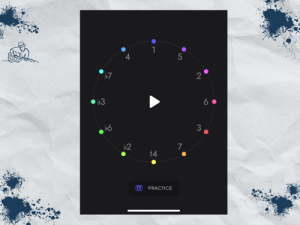
At the centre is the Sonofield Circle – a colourful interface inspired by the circle of fifths. Notes near each other feel similar. Notes across from each other? They sound worlds apart.
Compatibility and accessibility
The app runs on both Android and iOS devices. You can grab it for free from Google Play or the Apple App Store but I highly recommend the paid version because you can
- Change the tones from a synth to your natural instrument. I prefer the guitar sound.
- Access more advanced levels
If you want to grab 20% off, you can use my code DEMO20 at checkout. Visit https://sonofield.com/DEMO20 to get started
No ads pop up during training. That keeps things focused and distraction-free.
The interface uses visuals like the colour-coded circle, but the real learning happens through listening. It’s great for folks who learn best by ear.
Pocket mode lets you train hands-free. Practise while walking, doing chores, or commuting. This passive listening style fits into busy lives pretty easily.
Once downloaded, you don’t need an internet connection. Practise anywhere with no data worries or signal needed.
How the drone-based approach works
Sonofield’s method centres on playing notes against a steady background drone. This creates a tonal context where each scale degree has its own character and pull toward the home note.
Understanding the drone technique
The drone acts as a musical anchor. It plays nonstop while you hear individual notes or melodies layered on top.
This constant reference helps your ear figure out where each note sits in the key. It’s like always comparing colours to a white sheet of paper.
This approach lines up with how we actually hear music. Most songs have a tonal centre, even if it’s not obvious.
The drone makes the relationships clear. Your ear starts to notice the pull each note has back to “home.” Each scale degree develops its own “feeling-state”
Benefits over interval-based methods
Traditional ear training drills intervals – the distance between two notes. I hadn’t realised until trying the drone based approach that focusing on intervals without key references was disconnected from real music.
Drone-based training feels more like actual music. You’re not counting semitones or memorising interval names.
Some advantages I’ve noticed:
- Feels more intuitive than mathematical drills
- Builds functional hearing for improvisation
- Transfers better to real song situations
- Develops relative pitch in a natural way
When you sing against a drone, you can feel the tension and resolution. That physical sense sticks way better than abstract interval memorisation.
This method works especially well for singer-songwriters. You start to sense where melodies want to go within a key.
Role of scale degrees in aural training
Scale degrees use numbers (1-7) instead of note names. This works in any key. 1 always feels like “home” no matter if you’re in C major or F# major.
Each degree has its own vibe. The 5th feels stable and strong. The 7th feels tense and wants to resolve up.
Scale degree personalities:
- 1 – Restful, resolved
- 3 – Defines major or minor
- 5 – Solid foundation
- 7 – Pulls back to 1
This relative pitch trainer approach helps you navigate keys by feel, not calculation.
For melody ear training, the app moves from single notes to short phrases. That helps bridge the gap between isolated pitches and actual music.
Core features and modes
Sonofield builds its training around five modes, each targeting a different piece of scale-degree recognition. The colour-coded circle interface keeps things intuitive and helps you build your ear step by step.
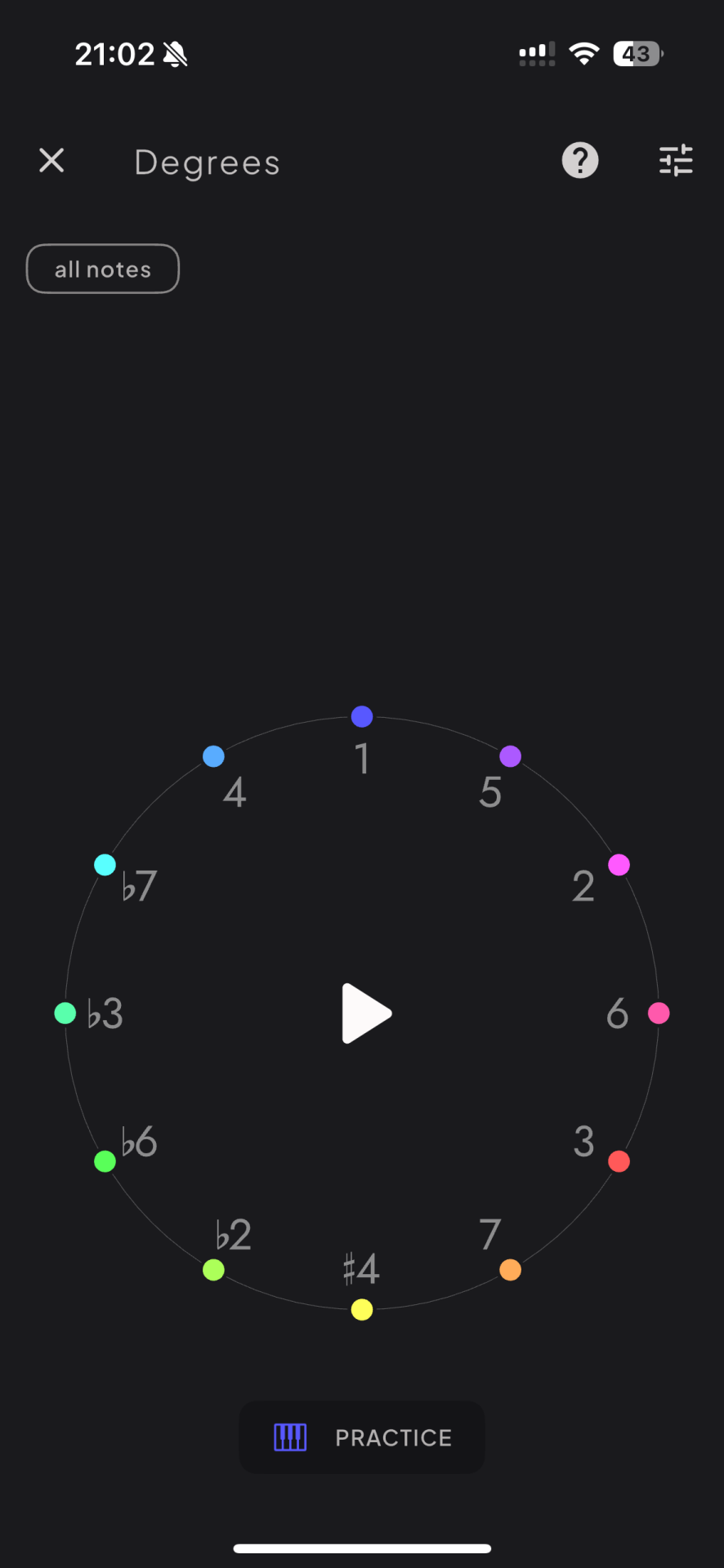
Degree recognition: Hear a note over the drone, identify the scale degree
This is the foundation. It’s simple—hear a note over a steady drone and figure out which scale degree it is.
The interface uses a colour-coded circle, based on the circle of 5ths, to make things easier visually.
The progression feels natural. Early levels start with just a few degrees like 1, 3, and 5. As you get better, you see chromatic notes like ♭7 and #4.
I like that the app doesn’t rush you. You have to get consistent accuracy before moving up. The drone makes each scale degree feel unique, not just abstract numbers.
Melody mode: Recognise short melodic fragments within a key
This mode goes beyond single notes. Now you listen to short, musical phrases.
The melodies are simple but actually sound like music. Usually three to five notes – nothing random or robotic.
I found this mode trickier than single-note recognition. The context changes how each note feels. A the 4th degree sounds different if you approach it from below or above.
What works well:
- Feels like real music
- Improves pattern recognition
- Gets you ready for actual songs
Could be better:
- Not a huge variety of melodies
- Few customisation options
- Needs more rhythmic diversity
Sing the degree (voice mode): Produce the target degree against the drone for intonation training
This mode flips things around. You see a scale degree and have to sing it accurately against the drone.
The app includes a built-in tuner for feedback. Aim for the middle of the bar to ensure you’re on pitch.
I found this the toughest mode at first. Singing in tune is harder than just recognising pitches. But practice really pays off here.
Why singing mode helps:
- Builds your internal pitch sense
- Improves vocal intonation
- Strengthens your ear-voice link
- Makes you more confident in pitch production
The tuner is a lifesaver. You can see exactly where you are and fix your pitch on the spot.
Voice mode works best with headphones. The app needs to separate your voice from the drone for accurate feedback. I also had some difficulty working out how to record as it wasn’t clear that you need to hold the microphone button down. So, make note of these two areas when trying it.
Pocket / hands-free mode: Train without looking at the screen
This passive listening mode is a great addition. Just listen as the app announces scale degrees and plays them over the drone.
It’s perfect for commutes, walks, or chores. I use it while washing dishes or during my morning walk to work.
The announcements are clear and not too fast. You hear the note over the drone then the number in the scale it represent. The repetition really helps the feeling-states stick.
This mode cycles through the degrees you’re working on. It doesn’t introduce new stuff, just reinforces what you’ve already learned.
For me, it’s great for locking in degrees I just started practising. The passive repetition helps recognition settle in without much effort.
User experience and interface
Sonofield’s interface stands out among ear training apps. The visual design is beautiful and I actually enjoyed how intuitive navigation was for a focused tool like this.
Audio quality
The drones give you clean, steady reference tones. Pitch stays solid the whole time you’re practicing.
I haven’t run into any weird audio glitches or pitch drift. The quality’s good enough to keep you focused.
The tones are clear, so you can really hear pitch differences. They sound fine whether you’re on phone speakers or headphones, which is honestly a nice touch.
Interface design and navigation
The app ditches the clutter I’ve seen elsewhere. Clean lines, simple buttons—no nonsense, just exercises.
Once you get going, swiping between exercises feels smooth. The settings panel just slides out from the side, never blocking your view.
Progress tracking stays minimal and helpful. Small indicators show accuracy, but nothing flashy or distracting shows up to mess with your focus.
Setting the key and context
Major and minor keys both get plenty of attention. The drone plays under every exercise, giving a steady tonal anchor.
I can tweak the drone’s volume to taste. Sometimes I want it louder for tough intervals, other times I keep it low as my ears sharpen up.
The key selection wheel feels snappy. Chromatic options cover the full range, and switching keys updates the drone instantly- no awkward audio gaps.
Use of colour and geometry
The visual system grabbed me right away. It’s a very modern design with soft purples and reds against a black background.
The “harmonic rainbow” just makes sense. Related notes get similar hues, and the colour wheel lines up with the circle of fifths, which is pretty clever.
For visual learners, the colour system is a bonus. After a while, my brain started linking feelings to certain colours, and this connection only got stronger with more practice.
The interface never feels childish. The geometric patterns add a little sophistication, and everything seems to serve the learning process. It’s clear that a lot of thought has gone into the visual elements.
Learning path and effectiveness
Sonofield builds ear training skills through a step-by-step sequence called “The Path.” From what I’ve seen, most musicians notice improvements within a few weeks of consistent practice.
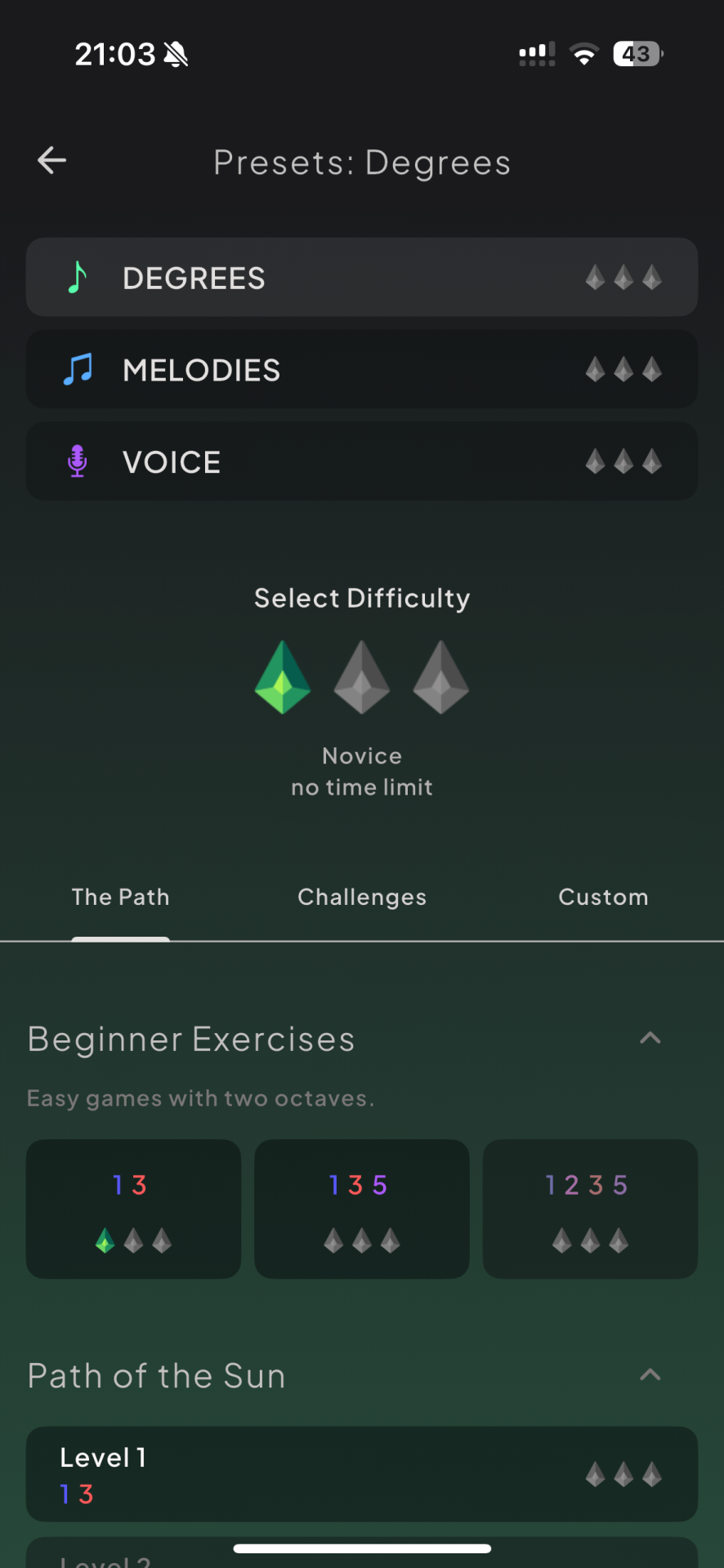
Step-by-step guided progression
The app introduces scale degrees gradually, using five distinct modes. Each one builds on the last.
The Path adds new degrees at each level, so you’re not hit with all 12 chromatic notes at once. That saves you from getting overwhelmed.
Timeframe for notable results
I’d say 5-15 minutes daily is the sweet spot for steady progress. More time isn’t always better with ear training.
I definitely felt an improvement in 2-3 weeks and I have been playing music, and struggling with ear training for two decades.
Certain degrees just click, while others take longer to really stick. I definitely feel that the sine waves of notes like the 3rd ‘spin’ differently in my head to the resolution of the root note.
Rest days matter too. Your brain needs space to process. I’ve honestly had my biggest leaps after taking a day off.
Integration with daily practice
The app fits right into regular practice routines. I usually start with 5 minutes of Free Play mode.
Switching between modes keeps things interesting. I bounce between Degrees, Melodies, and Voice modes instead of sticking to just one.
Consistency beats intensity here. Short daily sessions do more than long weekly marathons. Your ear grows gradually as you keep exposing it to each scale degree’s personality.
What makes Sonofield different from other ear training apps?
Sonofield takes a different approach to theory based ear trainers like Chet or Theta Music Trainer. And I love all three apps and feel they offer better results than Functional Ear Trainer.
If you are used to traditional ear training apps Sonofield’s method may be confusing at first and you may find the melody complexity simplistic compared to more advanced apps. If you’re after complex harmonic training, the focus on single notes and simple phrases might feel a bit basic.
But, I would definitely recommend combining this approach with
- Chet: The best app for melodic dictation and learning with popular songs
- Theta Music Trainer: which provides a greater range of harmonic and rhythmic learning game
Cost and accessibility
Sonofield stands out as a completely free ear training app with no ads and a cost-effective one time payment for the pro plan.
The difference between the two:
- Free = Full Degrees Mode, limited Voice and Melodies Modes, Pocket Mode, Free Play
- Pro = Full Path for all modes, realistic instrument sounds, full customisation
Free features and trial
The base version gives you everything you need to start training. You get Degrees Mode for single notes and Melodies Mode for melodic phrases.
The free version includes the core drone-based training. You can pick keys and practice at your own pace. Pocket Mode is there for hands-free training during commutes.
No time limits cut your sessions short. The app doesn’t throw ads between exercises, so you can just focus.
I found the free features pretty generous. Most ear training apps hide basics behind paywalls, but Sonofield’s approach feels refreshingly upfront.
Benefits of using the Pro plan
I’ve spent time with both versions. The free tier genuinely helps beginners build solid major scale recognition skills but the pro mode really helps you advance.
- The Pro mode unlocks full Voice Mode, letting you sing scale degrees into your phone’s mic for deeper learning.
- You get more customisation, like tweaking the sound of the drones and exploring extra practice modes.
I should highlight that pro is available for a one-time purchase and is not a recurring subscription. Bargain, really.
Not only that, it is incredibly high value. For less than the cost of a takeaway pizza you get the full package and are are supporting future development of the app.
From the developer
I spoke to Max, the app developer to get a sense of what’s coming and there are great enhancements in the pipeline.
“Statistics, solfege notation, just intonation, and expanded customization options are all coming soon to Sonofield. If you have feature requests, let us know via the feedback form within the app!”
The Solfege notation is of particular interest to me as I am trying to use that to develop my aural skills. In particular, I am testing myself every day to generate a C note using ‘Do’ without any reference pitch. Sometimes, I nail it, somethings it more of a B or C# but getting there!
I recommend getting Sonofield as a great relative pitch training app
Traditional interval training leans on mental math between notes. Sonofield, on the other hand, zeroes in on the feeling of each scale degree in a key.
The drone lays down a constant tonal foundation. Each note starts to take on its own vibe against that backdrop.
You skip the whole slow-thinking process. Intervals become more of a supporting skill, not the main event.
This method feels closer to how we actually experience music. Real music just moves too fast for interval calculations, doesn’t it?
Sonofield trains your instincts instead.
