


Table of Contents
Quality audio interfaces under £200 deliver professional recordings without breaking the bank. This guide covers eight tested options that balance features, sound quality, and value for home studios.

The right interface acts as a bridge between your microphones, instruments, and computer. I’ll walk you through ten solid options I’ve tested myself.
You’ll see which features actually matter and how to squeeze the best results from your setup.
1. Focusrite Scarlett 2i2 (3rd Gen)
The Scarlett 2i2 3rd Gen remains the world’s bestselling audio interface for good reason. It delivers two mic preamps with 56dB of gain, 24-bit/192kHz recording, and Air mode that adds presence to vocals.
I’ve been using Focusrite interfaces for over a decade. The Scarlett 2i2 3rd Gen is still my recommendation for any singer-songwriter just getting started.
 Focusrite Scarlett 2i2 4th Gen USB Audio Interface
 The Focusrite Scarlett 2i2 4th Gen is a compact USB audio interface featuring two combo XLR/TRS inputs, 120dB dynamic range, and advanced preamps. Ideal for singer-songwriters, it offers Auto Gain, Clip Safe technology, and Air mode for enhanced sound quality.
- Auto Gain and Clip Safe automate level control and prevent clipping
- 120dB dynamic range delivers clear, professional audio
- Air Mode and Harmonic Drive add analogue-style warmth
- USB powered for easy mobile recording
- Includes a comprehensive software bundle
- Gain Halos give instant visual feedback
- 3-year warranty for peace of mind
- Only two input - may not be enough for full band recording
- No MIDI I/O – requires a separate interface for controllers
- Global phantom power – can’t mix condenser and dynamic mics
- No ADAT – input count capped at two analogue channels
The preamps sound clean and musical. I’ve tracked everything from soft, fingerpicked guitars to big, belted vocals, and it always captures the detail I want for professional-sounding demos.
The software bundle includes Pro Tools First, Ableton Live Lite, and the Focusrite Plug-in Collective – actual value, not just demos.
Key specs:
- 2 combo XLR/TRS inputs
- 56dB gain range
- 120dB dynamic range
- USB-C connectivity
- Direct monitoring with zero latency
Price: £180 / $220
Best for: Singer-songwriters tracking vocals and guitar simultaneously, home studio owners needing reliable performance.
2. MOTU M2
The MOTU M2 features ESS Sabre32 DAC converters typically found in £500+ interfaces. This delivers 120dB dynamic range and exceptional transparency across the entire frequency spectrum.
 MOTU M2 USB-C Audio Interface
 MOTU usually makes gear for pros, but with the M2, they bring that expertise to home studios without the scary price tag.
The full-colour LCD metering provides real-time visual feedback – a professional feature at a budget price. Loopback functionality simplifies streaming and recording.
Ultra-low latency (2.5ms round-trip at 96kHz) makes recording feel smooth. No annoying delays when you’re monitoring through software. The all-metal construction feels premium and withstands transport.
Key specs:
- ESS Sabre32 Ultra DAC technology
- 120dB dynamic range
- Full-colour LCD metering
- USB-C bus powered
- Loopback for streaming
Price: £189 / $269
Best for: Producers who prioritise audio fidelity, those recording through software plugins with minimal latency.
3. PreSonus AudioBox USB 96
The AudioBox USB 96 simplifies recording with straightforward controls and Studio One Artist software included. Two combo inputs handle microphones and instruments, whilst the XMAX-L preamps deliver clean gain.
 PreSonus AudioBox 96 - USB Audio interface
 At 24-bit/96kHz, it captures more than enough detail for demos and YouTube content. The metal chassis feels solid despite the budget price.
Class-compliant drivers mean it works with iPad without additional hardware. Direct monitoring eliminates latency during tracking.
Key specs:
- 2 XMAX-L preamps
- 24-bit/96kHz recording
- USB 2.0 bus powered
- MIDI I/O included
- Studio One Artist DAW
Price: £89 / $99
Best for: Complete beginners starting their first home studio and songwriting needing simple two-input recording.
4. Audient EVO 4
The EVO 4’s Smartgain technology automatically sets optimal input levels – press the button, make sound, done. This eliminates guesswork for beginners whilst remaining fast enough for experienced engineers.
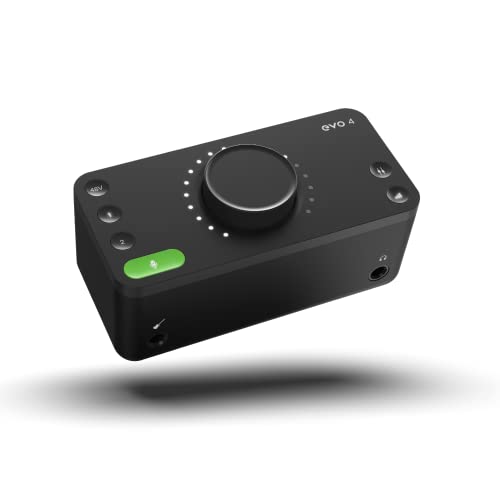 Audient EVO 4 USB Audio Interface
 Audient’s console-grade preamps (the same found in their professional mixing desks) deliver clarity and headroom. The JFET instrument input handles high-output pickups without distortion.
Loopback function routes computer audio back into the interface for streaming. The compact form factor fits laptop-based setups.
Key specs:
- Smartgain auto-levelling
- Console-grade preamps
- JFET instrument input
- Loopback for streaming
- 24-bit/96kHz recording
Price: £99 / $129
Best for: Musicians needing quick setup, beginners intimidated by gain staging.
5. Behringer UMC22
The UMC22 delivers Midas-designed preamps at an entry-level price. One XLR input and one 1/4″ instrument input cover solo recording scenarios. The 48V phantom power works with condenser microphones.
 Behringer UMC22 Audiophile 2x2, 48 kHz USB Audio Interface with Midas Mic Preamplifier
 Recording quality reaches 24-bit/48kHz – sufficient for demos, podcasts, and YouTube content. USB bus power and class-compliant drivers mean plug-and-play operation.
The plastic chassis feels adequate for bedroom use. Direct monitoring provides zero-latency tracking.
Key specs:
- Midas-designed preamp
- 24-bit/48kHz recording
- 48V phantom power
- USB bus powered
- Direct monitoring
Price: £47 / $59
Best for: Absolute budget recording, solo artists, those testing if home recording suits them.
6. Steinberg UR22C
The UR22C provides 32-bit/192kHz recording through USB 3.1 Type-C. Two Yamaha D-PRE preamps deliver clean gain with low noise floor. Onboard DSP powers latency-free monitoring with reverb and compression.
 Steinberg UR22C 2x2 USB 3.0 Audio Interface
 MIDI I/O connects keyboards and controllers. The metal chassis handles mobile recording sessions. Cubase AI software provides a complete production environment.
The dspMixFx controller software enables sophisticated monitor mixing with effects processing. Loopback facilitates streaming and re-recording.
Key specs:
- 32-bit/192kHz recording
- Yamaha D-PRE preamps
- Onboard DSP for effects
- MIDI I/O
- USB-C connectivity
Price: £149 / $179
Best for: Cubase users, keyboard players needing MIDI connectivity, those wanting DSP-powered monitoring.
7. Roland Rubix22
The Rubix22 operates on Mac, PC, and iPad – genuine plug-and-play across all platforms. Recording reaches 24-bit/192kHz. The metal chassis withstands mobile recording sessions.
 Roland Rubix22 2-In/2-Out USB Audio Interface
 Two combo inputs with phantom power handle microphones and instruments. MIDI ports come included. A lot of budget interfaces skip that, but here you can plug in keyboards or controllers.
The headphone output has enough juice for most headphones. I can monitor at high volumes without losing clarity.
Key specs:
- 24-bit/192kHz recording
- MIDI I/O
- iPad compatible
- Metal construction
Price: £139 / $169
Best for: Mobile producers recording with iPad, those needing zero-configuration setup across multiple computers.
8. IK Multimedia iRig Pro Duo
The iRig Pro Duo runs on batteries or bus power, enabling true portable recording. Dual XLR/TRS combo inputs with 48V phantom power handle professional microphones. Recording quality reaches 24-bit/96kHz.
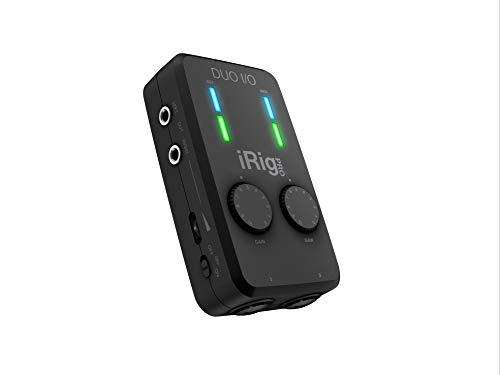 IK Multimedia iRig Pro Duo I/O USB audio interface
 Compatible with iOS, Android, Mac, and PC. The lightweight build fits mobile recording kits. Direct monitoring provides zero-latency tracking.
The included software bundle covers basic production needs. MIDI I/O connects portable keyboards.
Key specs:
- Battery or USB powered
- 24-bit/96kHz recording
- Dual combo inputs
- iOS/Android compatible
- MIDI I/O
Price: £169 / $199
Best for: Mobile recording and field recording away from computers, iOS-based production.
How to choose the right audio interface
Smart features matter more than shiny specs when you’re just starting out. I always focus on connectivity, audio quality, and build quality when I help people pick their first interface.
Connection types explained
USB-C is quickly becoming the standard for budget audio interfaces in 2025. It’s faster and just less hassle than old-school USB-A.
Most singer-songwriters need at least two inputs. One for your vocal mic, one for your guitar or keyboard.
Phantom power (48V) is non-negotiable if you’re using condenser microphones. All interfaces on this list include it.
1/4″ TRS outputs connect to studio monitors. Balanced outputs reduce noise over longer cable runs.
Headphone outputs should provide enough volume for your specific headphones. Low-impedance headphones (32Ω) work with all interfaces. High-impedance models (250Ω+) need stronger amplification.
Here’s what I always look for:
• XLR inputs with phantom power (+48V) for condenser mics
• 1/4-inch jack inputs for guitars and line-level stuff
• Headphone output with its own volume knob
• Monitor outputs for your studio speakers
I always check for direct monitoring. It lets you hear yourself with zero delay while tracking. Honestly, it’s a lifesaver for timing.
Technical specifications that matter
Sample rates like 44.1kHz or 48kHz are totally fine for demos. Don’t pay extra for 192kHz—you won’t notice the difference.
A 24-bit depth gives you plenty of headroom. Most affordable audio interfaces now include it as standard.
Dynamic range of 120dB ensures 24-bit recordings capture quiet passages without noise whilst handling loud peaks without distortion.
Here’s what matters to me:
| Specification | Good | Excellent |
|---|---|---|
| Dynamic range | 110 dB | 120 dB+ |
| Sample rate | 48 kHz | 96 kHz |
| Bit depth | 24-bit | 24-bit |
| Latency | <10 ms | <5 ms |
| Gain range | 50 dB | 60 dB+ |
Preamp quality impacts your recordings more than converters. Clean, quiet preamps with sufficient gain handle both dynamic and condenser microphones.
Latency under 10ms feels immediate during recording. Lower is better and ensures you stay in the groove, but diminishing returns set in below 5ms.
Build quality considerations
Metal beats plastic every time. Metal cases handle the knocks of home studio life and last longer.
Knobs should feel solid when you turn them. If they wobble, they’ll probably break and cause crackle.
I prefer interfaces that run off USB power. Fewer cables, less clutter, and easier to set up.
Weight says a lot about build:
• Under 500g: Usually plastic, fine for bedrooms
• 500g-1kg: Nice balance of durability and portability
• Over 1kg: Built like tanks, but not ideal for travel
Driver stability matters more than numbers on a spec sheet. I always check if my interface works smoothly with my computer’s OS.
Check the warranty before you buy. Two years or more means the company stands behind their gear.
Control placement affects workflow. Angled front panels (like Tascam US-2×2) improve accessibility. Top-mounted controls (like Focusrite Scarlett series) suit tight spaces.
LED indicators are underrated. Colour-coded signal and clip meters (green/yellow/red) prevent takes being ruined by distortion.
Software and compatibility
Your interface is only as good as the software running it. I always grab the manufacturer’s drivers first.
Go to your interface’s website and get the latest drivers. Don’t trust generic USB drivers—they cause clicks, pops, and random dropouts.
Class-compliant operation (no drivers needed) works across Mac, PC, and iOS. Convenient for mobile recording and using multiple computers.
Bundled DAW software varies in usefulness:
- Full versions (Studio One Artist, Cubase AI): Actually usable for complete projects
- Lite versions (Ableton Live Lite, Pro Tools First): Limited but functional
- Plugin bundles: Vary wildly in quality
Consider what you already own before valuing software bundles heavily.
Set your buffer size to 128-256 samples for recording. Lower means less delay, but higher helps prevent dropouts during playback. I usually start at 256. Drop it to 128 if you need real-time effects while tracking.
Also, keep an eye on your CPU while recording. If it creeps over 80%, bump up that buffer size. Your budget interface works best when your computer isn’t gasping for breath.
Comparison table
| Interface | Price | Inputs | Max Sample Rate | Key Feature | Best For |
|---|---|---|---|---|---|
| Focusrite Scarlett 2i2 | £180 / $220 | 2 | 192kHz | Air mode, proven reliability | Overall best choice |
| MOTU M2 | £189 / $269 | 2 | 192kHz | ESS Sabre32 DAC, LCD metering | Best sound quality |
| PreSonus AudioBox 96 | £89 / $99 | 2 | 96kHz | Studio One Artist included | Beginners |
| Audient EVO 4 | £99 / $129 | 2 | 96kHz | Smartgain auto-setup | Content creators |
| Behringer UMC22 | £47 / $59 | 2 | 48kHz | Midas preamps | Ultra-budget |
| Steinberg UR22C | £149 / $179 | 2 | 192kHz | Onboard DSP, Cubase AI | Cubase users |
| Roland Rubix22 | £139 / $169 | 2 | 192kHz | Driver-free operation | iPad recording |
| IK iRig Pro Duo | £169 / $199 | 2 | 96kHz | Battery powered | Mobile recording |
Which interface should you buy?
For most singer-songwriters: The Focusrite Scarlett 2i2 (3rd Gen) offers the best balance of sound quality, reliability, and features. It’s the safe choice.
If sound quality is paramount: The MOTU M2 delivers converters and metering found on interfaces costing three times more.
On a tight budget: The Behringer UMC22 provides Midas-designed preamps for under £50. Remarkable value if you only need basic recording.
For content creators and streamers: The Audient EVO 4’s Smartgain and loopback functions simplify setup whilst maintaining audio quality.
Recording with iPad: The Roland Rubix22 works without drivers across all platforms. Genuine plug-and-play.
Need portability: The IK Multimedia iRig Pro Duo runs on batteries, enabling field recording and mobile sessions.
Getting the best results from budget interfaces
Optimise your recording environment
Room treatment impacts recordings more than gear. Heavy blankets behind your microphone reduce reflections. Wardrobes provide surprisingly effective isolation for vocals.
Position your interface two feet from your computer. Electrical noise from processors and fans travels through USB cables. Physical distance reduces interference.
Use direct monitoring to hear yourself with zero latency. All interfaces on this list include this feature. Engage it during tracking, disable it during mixing.
Gain staging fundamentals
Aim for peaks around -12dB. This provides headroom whilst maintaining healthy signal levels. Never allow signals to reach 0dB (red on meters).
Start with preamp gain at minimum. Gradually increase whilst monitoring input levels. Stop when peaks reach -12dB to -6dB.
If uncertain, record quieter. Digital signals boost cleanly. Distorted recordings from excessive gain cannot be fixed.
Physical setup tips
Connect directly to motherboard USB ports. Avoid USB hubs and front panel connectors. These introduce noise and unreliable connections.
Use quality XLR cables. Cheap cables pick up interference and degrade signal. Invest £15-20 per cable for reliability.
Keep cable runs under 3 metres where possible. Longer runs require balanced connections to maintain signal quality.
Frequently asked questions
The WA-47Jr is a transformerless FET condenser microphone that runs on standard 48V phantom power and offers three polar patterns. The WA-47 tube version features authentic tube circuitry with VF14M valve character, an output transformer, nine polar patterns, and requires an external power supply.
Both use the same K47-style capsule, giving them similar warmth and character. The tube version costs roughly double but provides more vintage tone and recording options. For most project studio applications, the Jr delivers excellent results at a more accessible price point.
The WA-47Jr has a frequency range of 20Hz to 20kHz, capturing the full spectrum of human hearing. The K47-style capsule provides a slight presence boost in the upper mids (around 5-12kHz), which helps vocals and instruments cut through a mix naturally without harsh EQ.
The transformerless circuit maintains clarity across the entire frequency range whilst the gold-coated double large diaphragm adds analogue warmth to the midrange. This combination creates a balanced, vintage-inspired tone that flatters vocals and acoustic instruments.
The WA-47Jr benefits from quality preamps more than budget microphones. At minimum, use an interface like the Focusrite Scarlett 2i2 (£100-£150) or SSL 2+ (£200-£250). These provide clean gain and phantom power whilst preserving the mic’s detail.
For exceptional results, consider the Audient iD14 MkII or Universal Audio Apollo Twin. Their Class-A preamps and high-quality conversion truly maximise what the transformerless FET design can deliver. Avoid ultra-budget interfaces with noisy preamps – they’ll undermine the mic’s capabilities.
While it’s primarily designed as a studio microphone, you can use it live in controlled environments. The solid brass construction handles gentle knocks, and the three polar patterns offer flexibility for different stage setups.
However, condenser microphones are more sensitive to handling noise and feedback than dynamic mics. For typical live vocals, a dynamic mic like the Shure SM58 is safer. Use the WA-47Jr live only in quiet acoustic performances or when mounted securely on a stand.
Like all cardioid and figure-8 pattern microphones, the WA-47Jr exhibits proximity effect – bass frequencies boost when you’re very close to the mic. This can add warmth and body to thin voices, but too much proximity (under 10cm) makes vocals sound boomy and muddy.
For balanced tone, position the mic 15-20cm from your mouth. If you want more bass presence, move slightly closer (12-15cm). For a leaner, more natural sound, back off to 20-25cm. The built-in 70Hz high-pass filter also helps manage excessive low-end buildup.
Essential accessories for optimal results:
Shock mount: Reduces vibrations and handling noise (critical for this sensitive condenser)
Pop filter: Manages plosives on vocal recordings
Quality microphone cable: Preserves clean signal – don’t cheap out here
Room treatment: Even basic acoustic panels significantly improve results
Microphone stand: Sturdy boom arm or floor stand rated for the mic’s weight
The mic includes a basic stand mount, but investing in a dedicated shock mount improves isolation and reduces low-frequency rumble from floor vibrations.
Warm Audio designs the WA-47Jr series in the USA and oversees production in China. This approach keeps costs accessible whilst maintaining quality control standards. The modern circuitry and gold-coated double large diaphragm undergo rigorous testing to ensure consistency across units.
Microphone | Typical Price | Polar Patterns | Key Characteristic |
WA-47Jr | £350-£400 | 3 switchable | Vintage warmth, versatile |
Rode NT1 | £200-£250 | 1 (cardioid) | Ultra-low noise, neutral |
Audio-Technica AT4050 | £400-£450 | 3 switchable | Bright, detailed, studio standard |
AKG C414 XLII | £800+ | 9 switchable | Industry standard, maximum versatility |
The WA-47Jr offers exceptional value with three polar patterns and analogue warmth at a mid-range price point. It’s the sweet spot for project studios seeking versatility without breaking the bank.
Yes. Audio interfaces provide superior preamps and converters compared to computer sound cards. Even single-track recording benefits from phantom power, direct monitoring, and dedicated headphone amplification.
Interfaces with loopback functionality (EVO 4, MOTU M2, Steinberg UR22C) route computer audio back into the interface, simplifying re-recording from DAW tracks or sampling from online sources. Others require virtual audio routing software.
