


Table of Contents
Vocal effects pedals have evolved from clunky studio rack units into powerful tools any singer can use at home. These compact processors sit between your microphone and audio interface, adding reverb, delay, harmony, and pitch correction in real time. You hear what you’re getting straight away, which makes tracking demos feel more natural than relying entirely on plugins.
This guide covers the top pedals for home recording and live performance, followed by practical advice on setting up your signal chain, choosing the right effects, and avoiding common mistakes.
Quick comparison
| Pedal | Price | Best for | Key feature |
|---|---|---|---|
| TC-Helicon VoiceLive Play | ~£179 / ~$229 | All-round performance | 200+ genre presets with looper |
| BOSS VE-8 Acoustic Singer | ~£269 / ~$329 | Singer-songwriters | Dual vocal/guitar processing |
| Electro-Harmonix Voice Box | ~£210 / ~$261 | Harmony and vocoder effects | 256-band vocoder |
| Roland VT-4 Voice Transformer | ~£185 / ~$229 | Creative vocal transformation | Real-time pitch/formant control |
| Eventide H9 Max | ~£649 / ~$799 | Professional multi-effects | 52 studio-grade algorithms |
| Zoom V3 Vocal Processor | ~£179 / ~$199 | Budget home recording | 16 effects with USB interface |
| Radial Voco-Loco | ~£310 / ~$349 | Using guitar pedals on vocals | Mic preamp with effects loop |
1. TC-Helicon VoiceLive Play
Best for: Performers who need genre-ready presets and hands-free control
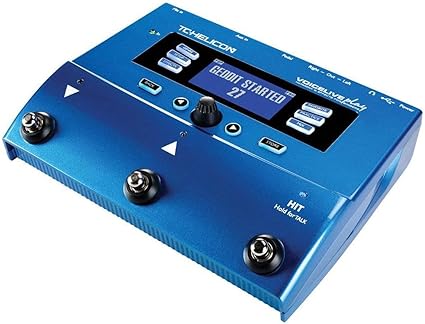
The VoiceLive Play combines a looper with comprehensive vocal effects in one compact unit. Its automatic backing harmonies analyse your input and generate musically appropriate parts without requiring you to set the key manually. The onboard pitch correction ranges from subtle tuning assistance to the hard-tuned effect popularised by T-Pain and Cher.
 TC-Helicon VoiceLive Play
 The TC-Helicon VoiceLive Play combines a looper with comprehensive vocal effects in one compact unit. Automatic backing harmonies analyse your input and generate musically appropriate parts without requiring manual key setting.
- 200+ genre-sorted presets provide polished sounds quickly
- HIT button activates effects only during specific song sections
- Built-in looper records vocal phrases for layering arrangements
- Smart pitch detection follows music via aux input or RoomSense mics
- Build quality adequate but not exceptional for price
- Can feel overwhelming for beginners with so many options
- Footswitch layout takes getting used to
- Preset editing requires some learning curve
What makes this pedal particularly practical is the footswitch control. The HIT button activates effects only during specific song sections, so you can add drama to a chorus without processing every word. Over 200 genre-sorted presets (rock, pop, R&B, country) provide starting points that get you close to polished vocal sounds quickly.
The built-in looper records vocal phrases for layering arrangements on the fly, which proves useful when working out demo ideas. Smart pitch detection follows your music via the aux input or built-in RoomSense microphones, adjusting harmonies to match whatever you’re singing along to.
Specifications: XLR input/output, 1/8″ aux input, USB connectivity, headphone output, 200+ presets, built-in looper
2. BOSS VE-8 Acoustic Singer
Best for: Singer-songwriters who play acoustic guitar
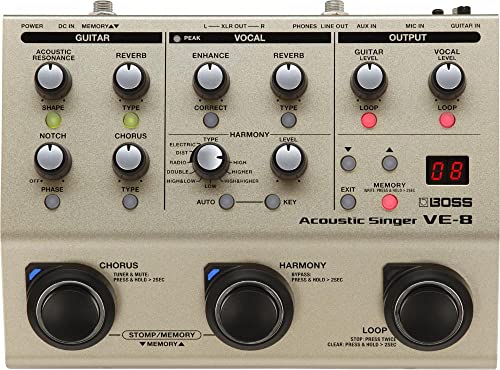
The VE-8 handles both vocals and acoustic guitar through independent processing channels, each with effects tailored to the source. This dual-channel approach means you can add reverb and compression to your voice whilst simultaneously applying resonance and chorus to your guitar, all from one compact pedal.
 BOSS VE-8 Acoustic Singer
 The BOSS VE-8 handles both vocals and acoustic guitar through independent processing channels. Dual-channel design means you can add reverb and compression to voice whilst applying resonance and chorus to guitar simultaneously.
- Dual vocal/guitar processing from one compact pedal
- Harmony engine tracks guitar chords automatically
- BodyRez technology restores natural acoustic resonance
- Battery or AC operation for genuine portability
- Higher price point than vocal-only alternatives
- Guitar-focused features wasted if you don't play acoustic
- Some users report hiss through certain PA systems
- Harmony modes take time to master
BOSS designed the vocal side with harmonies, pitch-based effects, and four ambience types. The harmony engine tracks your guitar chords automatically, generating backing vocals that follow your progressions. The guitar channel includes their BodyRez technology, which restores the natural resonance that piezo pickups often lack.
The dedicated phrase looper lets you build layered performances during live sets or recording sessions. Memory slots store your favourite combinations of settings for quick recall between songs. The VE-8 accepts both dynamic and condenser microphones (with phantom power) and runs on AC power or batteries for genuine portability.
Specifications: XLR mic input with phantom power, 1/4″ guitar input, stereo XLR outputs, phrase looper, battery or AC operation
3. Electro-Harmonix Voice Box
Best for: Vocalists who want harmony generation and classic vocoder sounds
The Voice Box creates two to four-part harmonies directly from your vocals, tracking your guitar or keyboard input to stay in key. Unlike some harmony pedals that sound robotic, this one produces smooth, natural glissando between notes rather than stepping mechanically from pitch to pitch.
 Electro-Harmonix Voice Box
 The Voice Box creates two to four-part harmonies directly from your vocals, tracking guitar or keyboard input to stay in key. The 256-band vocoder delivers clear speech intelligibility even when processing heavily.
- 256-band vocoder maintains speech intelligibility
- Smooth natural glissando between harmony notes
- Gender Bender control shifts male/female formants
- Nine tweakable presets store favourite settings
- Requires instrument input for harmony tracking
- Setup more involved than simpler pedals
- Learning curve steeper than basic effects
- Vocoder sound may not suit all musical styles
The 256-band vocoder delivers clear speech intelligibility even when processing heavily, meaning your words remain understandable rather than dissolving into synth mush. This vocoder uses the same design principles as the classic EMS units that made vocoding famous in the 1970s. The Gender Bender control shifts formants to create male or female vocal characteristics, useful for layering different textures in a recording.
Nine tweakable presets store your favourite settings. The built-in mic preamp includes phantom power for condenser microphones, and the balanced XLR output connects directly to mixing desks or audio interfaces. Setup requires connecting both your microphone and an instrument (guitar or keyboard) so the harmony engine knows what key you’re in.
Specifications: XLR mic input with phantom power and gain switch, 1/4″ instrument input, balanced XLR line output, 9 presets, studio reverb
4. Roland VT-4 Voice Transformer
Best for: Creative vocal manipulation and experimental sounds
The VT-4 handles everything from subtle pitch correction to extreme vocoder effects without requiring menu diving. Every control sits on the front panel with dedicated faders for pitch and formant adjustment, letting you dramatically change your vocal character in real time. Shift from male to female, big to small, or natural to robotic with smooth, artefact-free transitions.
 Roland VT-4 Voice Transformer
 The Roland VT-4 handles everything from subtle pitch correction to extreme vocoder effects without menu diving. Dedicated faders for pitch and formant adjustment let you change vocal character dramatically in real time.
- Real-time pitch and formant control via dedicated faders
- No menu diving required for any function
- Stack multiple effects simultaneously
- 5-hour battery life for portable use
- Not ideal for subtle natural vocal processing
- Compact controls can feel fiddly
- USB audio interface limited to basic functions
What sets this apart from traditional vocal processors is its focus on transformation rather than polish. The Megaphone button adds lo-fi grit. The vocoder creates classic synth-robot sounds. The harmony engine generates multi-part backing vocals. Stack multiple effects simultaneously for genuinely unusual textures.
The compact desktop design fits easily into home studios, and five hours of battery life makes it portable for mobile recording. Eight memory slots store effect combinations for quick recall. MIDI input enables keyboard control over harmonies and pitch correction, whilst USB connectivity lets it function as an audio interface for recording directly into your DAW.
Specifications: XLR and 1/4″ mic inputs, USB audio interface (24-bit/96kHz), MIDI input, 8 memory presets, 5-hour battery life
5. Eventide H9 Max Harmonizer
Best for: Professional-quality multi-effects without plugin latency
The H9 Max provides access to 52 algorithms from Eventide’s legendary effects pedals, covering reverb, delay, chorus, pitch-shifting, and modulation. That’s essentially four high-end pedals in one compact unit. The pitch-shifting proves particularly useful for creating backing vocal layers when tracking demos alone.
 Eventide H9 Max
 The Eventide H9 Max provides access to 52 algorithms from Eventide's legendary effects pedals covering reverb, delay, chorus, pitch-shifting and modulation. Essentially four high-end pedals in one compact unit.
- 52 studio-grade algorithms in one pedal
- 500+ presets available via free H9 Control app
- Future algorithm updates included free
- Professional build quality matches premium price
- Premium price point
- Steeper learning curve than simpler pedals
- Single knob interface requires app for easy editing
- Overkill for basic vocal processing needs
The pedal ships with 99 presets, and over 500 additional presets are available through the free H9 Control app. This app makes editing far easier than using the single onboard knob, letting you adjust parameters with visual feedback on your phone or tablet. Future algorithm updates come free, adding value over time.
Build quality matches the professional price point. Two footswitches handle preset changes and bypass during live performances. Stereo inputs and outputs provide routing flexibility for more complex setups. The learning curve is steeper than simpler pedals, but the sonic quality rewards the investment.
Specifications: Stereo 1/4″ inputs/outputs, USB connectivity, Bluetooth control via app, 99 onboard presets, 52 algorithms included
6. Zoom V3 Vocal Processor
Best for: Budget-conscious home recording and streaming
The Zoom V3 packs 16 studio-grade effects into a compact tabletop unit designed for bedroom studios and content creators. The three-part harmony function tracks accurately and adds richness to backing vocals without requiring multiple takes. Real-time pitch correction stays subtle enough for natural-sounding results.
 Zoom V3 Vocal Processor
 The Zoom V3 packs 16 studio-grade effects into a compact tabletop unit designed for bedroom studios and content creators. Three-part harmony tracks accurately and adds richness without requiring multiple takes.
- 16 effects with dedicated knobs eliminate menu diving
- Enhance control automatically optimises mic preamp response
- USB connectivity functions as 24-bit audio interface
- Battery power enables portable outdoor recording
- Build quality lighter than professional alternatives
- Sound quality adequate but not exceptional
- Optional footswitch needed for hands-free control
Dedicated knobs for reverb, delay, and compression eliminate menu diving. The Enhance control automatically optimises the preamp response for whatever microphone you connect, which helps less experienced users get decent sounds quickly. Creative effects like vocoder, talk box, and beat box expand beyond standard processing.
Battery power (3.5 hours from 4 AA cells) makes it portable for outdoor sessions or locations without mains access. The USB connectivity lets the V3 function as a 24-bit audio interface, simplifying workflow for recording directly into a DAW. An optional footswitch adds hands-free control during performance.
Specifications: XLR input with 48V phantom power, USB 2.0 audio interface (24-bit/44.1kHz), line outputs, headphone output, aux input, battery or USB powered
7. Radial Engineering Voco-Loco
Best for: Using guitar pedals on vocals
The Voco-Loco solves a specific problem: how to run your microphone signal through guitar effects pedals. It combines a studio-quality mic preamp with a transformer-isolated effects loop, matching the different levels and impedances so guitar pedals work properly with vocal signals.
 Radial Voco-Loco
 The Radial Voco-Loco solves how to run microphone signal through guitar effects pedals. It combines a studio-quality mic preamp with transformer-isolated effects loop, matching levels and impedances properly.
- Studio-quality mic preamp with phantom power
- Transformer-isolated effects loop reduces hum and buzz
- Two-band EQ shapes tone before effects chain
- Blend control mixes dry and wet signals precisely
- Requires separate guitar pedals for actual effects
- Higher cost when pedals are factored in
- More complex setup than all-in-one processors
- Niche use case compared to dedicated vocal pedals
The two-band EQ shapes your tone before the signal hits the effects chain, helping match vocal frequencies to pedals designed for guitar. Individual send and receive controls optimise signal-to-noise ratio and reduce distortion. A tone control on the return path smooths overly bright pedals, whilst the blend knob mixes dry and wet signals.
The right footswitch activates the effects loop. The left footswitch serves double duty as either a mute (for between songs) or a 100% wet mode (for ambient effects without any dry signal). The preamp accepts both dynamic and condenser microphones with switchable phantom power. This pedal excels for singers who already own guitar effects and want to incorporate them into their vocal sound.
Specifications: XLR mic input with phantom power, 1/4″ send/return effects loop, XLR output, 2-band EQ, blend control, dual footswitches
Buyer’s guide: vocal effects for home recording
Setting up your recording chain
Most vocal effects processors connect between your microphone and audio interface. Your mic plugs into the pedal’s XLR input, and the pedal’s output connects to your interface’s mic input. If you’re using a condenser microphone, confirm your pedal has phantom power pass-through, otherwise you’ll need to get phantom power from your interface via a different route.
Great for Solo Musicians  |  |  |
Our Rating: 4.1 | Our Rating: 3.5 | Our Rating: 3.5 |
$599.00 | $399.99 | $224.99 |
Gain staging determines whether your recordings sound clean or muddy. Start with your pedal’s input gain, aiming for signal activity in the green zone with peaks touching yellow but never red. Then adjust your interface’s input trim so you’re recording between -18dB and -12dB on average, with peaks around -6dB. If your pedal has compression active, set basic gain first, add effects, then recheck levels.
For monitoring, use your pedal’s headphone output for zero-latency playback. If you monitor through your DAW instead, disable the track’s input monitoring whilst recording through a pedal, otherwise you’ll hear your effected signal twice. Keep monitoring reverb around 30% wet during tracking so you can still judge pitch accuracy.
Effects that matter for home demos
A proper preamp stage transforms thin, lifeless recordings into something with clarity and warmth. Most vocal pedals include built-in preamps that provide the gain boost your microphone needs. Getting this right saves hours of corrective EQ in the mix.
Light compression before the DAW helps control wild volume jumps between soft verses and loud choruses. Aim for 2:1 to 3:1 ratio with a gentle attack. You shouldn’t hear the compressor working; you should just notice that quiet parts are more audible and loud parts don’t clip.
De-essing targets harsh ‘s’ and ‘t’ sounds in the 5-8kHz range without dulling your entire vocal. You’ll need this more if you’re using a bright condenser microphone, if you naturally have strong sibilance, if you’re recording close to the mic, or if you’re adding reverb or delay that emphasises high frequencies. Start subtle; too much de-essing creates a lisp.
A touch of reverb and delay helps your voice sit in a natural space rather than sounding like you’re singing in a cupboard. Keep it subtle during tracking since you can always add more in the mix but can’t remove effects baked into your recording. Short reverb with decay under one second works best. Slapback delay around 80-120ms creates a subtle doubling effect.
What to commit vs leave for mixing
Some effects should almost always wait until mixdown. What sounds gorgeous whilst you’re singing might drown your vocal once you add guitars and drums. Heavy reverb and dramatic delays are best added later when you can hear how they fit with everything else.
Pitch correction is a grey area. Light correction can help you perform better by building confidence in your headphones, but keep it subtle whilst tracking. You can always add more later with software if needed.
Record your vocals as clean as possible. Add a tiny bit of reverb or delay if you need it for confidence whilst tracking, but save creative effects for mixing when you can actually hear how they fit with everything else. If you can’t imagine removing the effect later, don’t use it whilst recording.
Common mistakes to avoid
The biggest mistake is over-processing whilst tracking
Once heavy effects are printed to the track, you’re stuck with them. Recording a demo with too much chorus on the lead vocal sounds incredible in the moment, but when you try to mix it weeks later, the vocal sits weird and you can’t fix it.
Signal flow trips up beginners constantly too
Your microphone needs to hit a preamp or impedance matcher first, then effects pedals, then your interface or mixer. Skip any step and you’ll get weak signal, excessive noise, or feedback. Dynamic mics like the SM58 cause fewer headaches in pedal setups than condensers, which are more sensitive to feedback.
Unnecessary gear purchases waste money
You don’t need five reverb pedals or a £300 harmoniser when you’re still figuring out basic delay settings. Start with one or two pedals that fit your sound and learn them properly. A simple delay and reverb cover most home recording needs. Add more gear only when you know exactly what sound you’re missing.
Troubleshooting your signal chain
Hiss and noise usually come from rubbish cables or bad gain staging. Start with decent shielded cables; cheap ones pick up interference from laptops and phone chargers. If you’re cranking your preamp too high then lowering volume later, you’re amplifying noise along with your signal.
That annoying 50Hz or 60Hz hum? Probably a ground loop. This happens when different pieces of gear are plugged into different outlets, creating multiple paths to ground. Plug everything into the same power strip. If that doesn’t fix it, try the ground lift switch on your DI box.
Thin, lifeless sound when connecting a mic to guitar pedals indicates an impedance mismatch. Microphones output mic-level signal, but guitar pedals expect instrument-level signal. You need something in between to boost and match impedance. A small inline transformer or a dedicated preamp like the Radial Voco-Loco solves this. Don’t just use an XLR to quarter-inch adaptor; it changes the connector but not the signal itself.
Final thoughts
The right vocal effects pedal depends on what you’re trying to achieve. Singer-songwriters who play acoustic guitar will appreciate the BOSS VE-8’s dual processing. Vocalists who want instant harmonies should look at the TC-Helicon VoiceLive Play or Electro-Harmonix Voice Box. Home recordists on a budget can get surprisingly far with the Zoom V3.
If you already own guitar pedals and want to use them on vocals, the Radial Voco-Loco opens up that possibility without the impedance headaches. For professional-quality effects that rival plugin processing but without the latency, the Eventide H9 Max justifies its premium price.
Whatever you choose, remember that hardware effects printed during tracking can’t be undone. Start subtle, learn your pedal thoroughly, and save the heavy processing for mixing when you can hear how it fits with everything else.
