


Table of Contents
Good studio monitors can totally change your home recordings and are designed for critical listening during music production. Unlike computer speakers that colour the bass and treble to sound pleasing, studio monitors reveal your mix exactly as it is – warts and all.

After 20 years of music production in various room sizes, I’ve learned that accurate monitoring systems make the difference between demos that translate well everywhere and mixes that only sound good in your room.
The monitors below all deliver honest sound for under £300. I’ve tested each in different room acoustics and compared them against reference mixes to see how they handle real recording sessions.
You don’t need expensive studio gear to achieve professional results. What matters is choosing monitors that suit your room size, understanding monitor placement fundamentals, and doing basic room treatment to control reflections.
What makes studio monitors different from regular speakers?
Studio monitors prioritise accuracy over enjoyment. They’re built for music makers who need to hear problems in their recordings, not speakers that hide them.
The key differences:
- Flat frequency response – Studio monitors aim for neutral sound across the audible spectrum. Computer speakers boost bass and treble to sound impressive, which masks mix problems.
- Near-field design – Most home studio monitoring relies on near-field speakers positioned close to your ears. This reduces room reflections and lets you hear the direct sound from the drivers.
- Powered design – Studio monitors include built-in power amplifiers specifically matched to their drivers. This active design eliminates the need for separate amplifier equipment.
- Honest sound – Studio monitors reveal harsh frequencies, muddy bass, and imbalanced levels. That clarity helps you make better decisions when recording vocals and mixing instruments.
The downside? Music often sounds less exciting on monitors than through hi-fi speakers. That’s intentional. Flattering your mixes during recording leads to disappointment when you play them back on other systems.
1. Kali Audio LP-6 V2
Price: £249 per pair | Driver size: 6.5-inch woofer
The Kali Audio LP-6 V2 completely changed how I think about budget monitoring. The remarkable neutrality means you hear what I’d call “honest” sound. They don’t sugarcoat your mixes or hide mistakes.
That flat frequency response makes mixing easier. I don’t second-guess the balance between instruments or wonder if my bass sounds right.
 KALI AUDIO LP-6 V2 Studio Monitor
 Flat, transparent sound ideal for home studios. The 6.5″ woofer delivers real low-end without a sub. Solid build, front-ported design and 80 W output make it powerful yet accurate. Exceptional value for professional-grade monitoring.
- Exceptional frequency response flatness reveals mix problems clearly
- 6.5-inch woofer delivers genuine low-end extension without a subwoofer
- 80W total power provides ample maximum SPL for home studios
- Front-ported design works near walls in smaller room sizes
- Solid cabinet construction from experienced loudspeaker engineers
- Neutral sound character doesn't flatter or hype recordings
- No room correction features like some competitors offer
- Rear-panel controls only - no front volume adjustment
- Larger footprint than 5-inch monitors. Requires more desk space
The 6.5-inch woofer delivers enough low-end for most music production without needing a subwoofer. Total power output hits 80 watts, giving you plenty of maximum SPL for home recording.
Kali Audio’s founders bring decades of loudspeaker engineering experience, and it shows in the build quality. The speaker cabinet feels solid and the drivers handle volume cleanly.
These monitors suit small to medium room sizes particularly well. The front-ported design reduces issues when placing them near walls.
For aspiring music makers wanting professional-level performance, the LP-6 V2 is hard to beat at this price.
Best for: Home studios needing accurate monitoring without spending £500+
2. Adam Audio T5V
Price: £279 per pair | Driver size: 5-inch woofer
The Adam Audio T5V is the most respected budget studio monitor I’ve encountered in 20 years. These 5-inch nearfield speakers deliver surprising clarity for compact spaces.
Adam Audio built their reputation on precision. The T5V offers balanced sound, solid stereo imaging, and decent volume from a speaker cabinet designed for tight spaces where most home recording happens.
 ADAM Audio T5V Studio Monitor
 Compact and precise, the T5V offers clear, uncoloured sound perfect for small rooms. Adam’s ribbon tweeter delivers crisp highs and balanced mids, while the 5″ woofer provides controlled bass. An honest, space-friendly monitor for detailed mix work.
- Adam Audio's precision engineering delivers exceptional clarity at this price
- Compact 5-inch design perfect for small room sizes under 12 square metres
- Honest, uncoloured sound reveals recordings truthfully without flattery
- Excellent stereo imaging helps position elements accurately in mixes
- Balanced XLR and TRS connectivity works with any audio interface
- Respected brand with proven reputation in professional studios
- Limited low-end extension. Bass-heavy genres may need a subwoofer
- No built-in room correction or Digital Signal Processing features
- Rear-ported design requires clearance from walls
- No front-panel volume control for quick adjustments
What stands out is the honest presentation. These don’t hype your mixes or add warmth. They reveal what’s actually there. That accuracy helps during critical listening sessions when you’re making mix decisions.
The 5-inch woofer provides enough low-end for most music production in smaller room sizes. Unless you’re making bass-heavy electronic music, you won’t need a subwoofer.
I recommend these for singer-songwriters working in bedrooms or small studios. The T5V excels in environments where larger monitors would overwhelm the room acoustics.
Connection is straightforward with balanced XLR and TRS inputs that work with any digital audio workstation setup.
Best for: Bedrooms and small control rooms under 12 square metres
3. JBL 305P MkII
Best value for money
Price: £149 each | Driver size: 5-inch woofer
The JBL 305P MkII delivers professional monitoring quality at a price that won’t empty your wallet. At £149 per speaker, these represent exceptional value in studio gear.
The 5-inch drivers produce balanced, clear sound with wide stereo imaging that helps when placing vocals in your mix during music production.
I appreciate how accurate these monitors sound. They don’t flatter your recordings with enhanced bass or bright highs. That honesty makes mixing decisions easier.
The built-in power amplifiers have sufficient headroom for home studios. You can push them to reasonable maximum SPL without hearing distortion or compression.
Setup works with standard XLR and TRS inputs that connect directly to any audio interface or digital audio workstation output.
Many producers rely on these as their primary home studio monitoring solution, which speaks volumes about their performance. The compact speaker cabinet fits most desks without dominating smaller room sizes.
Best for: Budget-conscious musicians needing accurate monitoring under £300
4. Yamaha HS5
Price: £400 per pair | Driver size: 5-inch woofer
Yamaha HS5 monitors have been in countless recording sessions. They’re like a trusted friend who never sugar-coats your mixes.
Those distinctive white cones deliver flat, honest sound that reveals every detail in vocals and instruments. This transparency helps during critical listening when you need to catch problems before they reach final mixes.
 Yamaha HS5 Powered Studio Monitor
 Trusted for its brutally honest sound, the HS5 exposes every mix flaw. Flat response, tight bass and simple room controls make it ideal for producers seeking accuracy over flattery. Compact, durable and a genuine studio reference.
- Brutally honest flat frequency response reveals every mix detail and mistake
- Industry-standard monitoring trusted in professional and home studios worldwide
- Bi-amplified design keeps bass tight and controlled for accurate mixing
- Mixes translate exceptionally well to other playback systems
- Compact dimensions (6.7" × 11.25" × 8.75") suit smaller studio spaces
- Simple room control and high trim switches help compensate for room acoustics
- Honest sound can be fatiguing during long mixing sessions
- Limited bass extension - electronic producers may need a subwoofer
- No modern features like Digital Signal Processing or room correction software
- Higher price compared to some competitors
- White cone aesthetic polarises opinion (though purely cosmetic)
The HS5 measures 6.7″ × 11.25″ × 8.75″ and weighs about 12 pounds per speaker. That compact size suits smaller studios without hogging desk space. Perfect for typical home recording room sizes.
Each monitor uses a 5-inch woofer in a bi-amped design. The separate power amplifiers for woofer and tweeter keep bass tight and controlled, helping your mixes translate well to other playback systems.
Yamaha keeps controls simple. Room control and high trim switches on the rear panel let you dial in your sound for your specific room acoustics.
The HS5 works brilliantly for music production across all genres. These monitors have become reference standards in home studio monitoring for good reason.
Best for: Musicians who need brutally honest feedback on their mixes
5. KRK Rokit 5 G4
Price: £145 each | Driver size: 5-inch woofer
I’ve relied on KRK monitors for years. The Rokit 5 G4 stands out as one of the best budget options for music production with strong low-end content.
KRK packs a 5-inch woofer into a compact speaker cabinet perfect for small home studios with limited space. Earlier KRK models tended to hype bass and make highs harsh, but the G4 version sounds much more balanced.
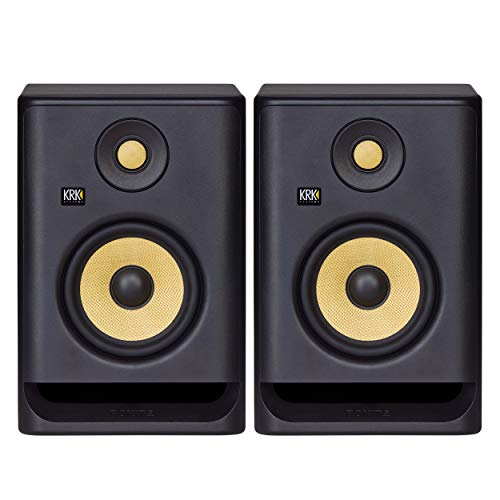 KRK RP5 Rokit 5 G4 Professional Bi-Amp 5" Powered Studio Monitor Pair, Black
 Compact and balanced, the KRK Rokit 5 G4 delivers tight low-end and clear mids ideal for electronic music. DSP room correction and front-ported design improve accuracy in small spaces, making them a reliable, affordable choice for home producers.
- Digital Signal Processing room correction compensates for poor room acoustics
- Extended bass response suits electronic music production without a subwoofer
- Much more balanced sound than earlier KRK models (less hyped)
- Front-ported design allows flexible monitor placement near walls
- Kevlar woofer handles dynamic material without distortion at reasonable volumes
- Bass still slightly enhanced compared to ultra-flat reference monitors
- DSP room tuning requires careful adjustment to avoid over-correction
- Yellow cone aesthetic doesn't suit every studio setup
- Rear-panel LCD screen and controls can be fiddly to adjust
- Some find the treble slightly harsh during extended critical listening sessions
The built-in Digital Signal Processing room correction feature is genuinely useful. You can tune the monitors to compensate for your room acoustics, which helps if your space isn’t properly treated.
These monitors work brilliantly for singer-songwriters keeping costs down whilst maintaining decent sound clarity. They reveal sufficient detail for mixing vocals and acoustic instruments.
The bass response particularly suits electronic music styles where low-end accuracy matters. That extended frequency range helps during critical listening when you’re checking sub-bass content.
Build quality feels sturdy for £145 per speaker. The front-ported design reduces problems with monitor placement near walls, giving you more flexibility in smaller room sizes.
Best for: Electronic producers needing extended bass response without a subwoofer
6. PreSonus Eris E5
Price: £189 per pair | Driver size: 5-inch woofer
The PreSonus Eris E5 hits a sweet spot between performance and price. These 5-inch monitors deliver honest, clear sound that serves music production well.
The rear panel offers extensive connection options – balanced XLR, TRS, and unbalanced RCA inputs. This flexibility means you can connect them to virtually any audio interface, mixer, or even consumer equipment without adaptors.
 PreSonus Eris E5 2-Way 5.25" Near Field Studio Monitor
 Versatile and affordable, the Eris E5 offers clear, balanced sound with flexible connectivity. Built-in acoustic tuning adapts to your room, while the front-ported design suits tight spaces. A dependable all-rounder for project studios.
- Extensive connectivity with balanced XLR, TRS, and unbalanced RCA inputs
- Acoustic space tuning and low-cut filter help compensate for room acoustics
- Front-ported design eliminates placement restrictions near walls
- Honest sound clarity reveals sufficient detail for home studio monitoring
- Kevlar drivers handle reasonable maximum SPL without distortion
- Good value per pair with useful room adjustment features
- Sound quality trails the top performers in this price range
- Midrange can sound slightly boxy compared to more expensive monitors
- Build quality feels adequate rather than impressive
- No modern features like Digital Signal Processing or Bluetooth
- Bass response less extended than some 5-inch competitors
- Treble occasionally sounds slightly harsh at higher volumes
PreSonus includes useful tuning controls for room acoustics. The acoustic space settings and low-cut filter help tame bass buildup, particularly important in smaller, untreated room sizes.
The front-ported speaker cabinet design works brilliantly in compact spaces. You don’t need to stress about monitor placement distance from walls. The ports won’t excite room modes as aggressively as rear-ported designs.
Build quality feels solid for the price point. The drivers handle reasonable maximum SPL levels without distortion, making them suitable for home studio monitoring across various music genres.
These monitors reveal sufficient detail for music makers to make informed mixing decisions. The sound clarity helps you catch problems during recording and mixing sessions.
Best for: Studios needing flexible connectivity with multiple audio sources
7. M-Audio BX5 D3
Price: £179 per pair | Driver size: 5-inch woofer
I’ve recommended the BX5 D3 countless times to musicians just getting into home recording. These monitors offer excellent value for those building their first proper studio setup.
The 5-inch woofer delivers balanced, clear sound across genres. That versatility matters when you’re exploring different styles of music production.
 M-AUDIO BX5 Single 5" 100W Studio Monitor Speaker
 Tiny yet powerful, the iLoud Micro delivers decent clarity and bass from 3″ drivers. Bluetooth, EQ controls and portability make it ideal for mobile producers or cramped workspaces needing accurate monitoring on the move.
- Military-grade Kevlar drivers provide durability and consistent performance
- Balanced frequency response works across all music production genres
- Simple connectivity with XLR and balanced TRS inputs
- Honest sound without flattery helps develop critical listening skills
- Compact speaker cabinet fits typical bedroom studio desk setups
- Reliable build quality withstands years of enthusiastic home use
- No room correction features to compensate for poor acoustics
- Bass extension limited compared to larger or more expensive monitors
- Basic feature set lacks modern conveniences
- Rear-ported design requires clearance from walls
- Sound quality adequate rather than exceptional for the price
- No front-panel volume control for convenient adjustments
These monitors maintain honest frequency response without flattering your recordings. The sound remains true without making tracks sound better than they actually are – crucial for learning proper mixing technique.
Connectivity is straightforward with rear-mounted XLR and balanced TRS inputs that work with any digital audio workstation interface. Setup takes minutes even for complete beginners.
The military-grade Kevlar drivers handle dynamic tracks without distorting at reasonable listening volumes. That durability means they’ll survive years of enthusiastic bedroom production sessions.
The compact speaker cabinet design fits most desks without overwhelming smaller room sizes. They won’t dominate your workspace in typical home studio environments.
For the money, these monitors punch well above their price point. They provide sufficient accuracy for developing critical listening skills whilst remaining affordable.
Best for: Complete beginners starting their first home studio on a tight budget
8. IK Multimedia iLoud Micro Monitor
Best portable option
Price: £299 per pair | Driver size: 3-inch woofer
The iLoud Micro Monitors deliver surprisingly balanced sound from tiny speaker cabinets. These punch well above their physical size.
Each monitor squeezes a 3-inch woofer and ¾-inch tweeter into compact boxes perfect for cramped home studios. Despite the small drivers, the bass response exceeds expectations. There’s genuine low-end extension that larger budget monitors struggle to match.
 IK Multimedia iLoud Studio Reference Monitors
 Tiny yet powerful, the iLoud Micro delivers impressive clarity and bass from 3″ drivers. Bluetooth, EQ controls and portability make it ideal for mobile producers or cramped workspaces needing accurate monitoring on the move.
- Exceptional bass extension from tiny 3-inch drivers defies physical limitations
- Ultra-compact size perfect for cramped desks and portable recording setups
- Built-in Bluetooth enables wireless playback for referencing commercial tracks
- 50W RMS combined power delivers surprising maximum SPL for the size
- Adjustable EQ and low-cut filter help compensate for room acoustics
- Pro version includes room calibration software for acoustic correction
- XLR and RCA connectivity suits various digital audio workstation interfaces
- Small drivers can't match midrange detail of full-size monitors
- Bass impressive for size but less controlled than proper 5-inch woofers
- Bluetooth audio quality not suitable for serious critical listening work
- Limited stereo imaging width due to extremely compact speaker cabinet spacing
- Desktop placement risks bass coupling with desk surface
Combined power output reaches 50W RMS, providing more than adequate maximum SPL for nearfield monitoring in small room sizes. They deliver sufficient volume for critical listening during music production.
Built-in Bluetooth connectivity is genuinely handy. I often reference commercial tracks wirelessly whilst mixing, making A/B comparisons easier without cable swapping.
The adjustable EQ controls help you compensate for room acoustics. The low-cut filter particularly helps in tight spaces where bass can accumulate and muddy your monitoring.
Setup works with XLR or RCA inputs, connecting easily to any digital audio workstation interface. The compact size makes them brilliant for portable recording setups when you work in different locations.
The Pro version adds room calibration software that analyses and corrects for acoustic problems in your space, useful if proper room treatment isn’t feasible.
Best for: Mobile producers working in multiple locations or extremely small spaces
9. Mackie CR4
Price: £179 per pair | Driver size: 4-inch woofer
The Mackie CR4 monitors have earned their reputation as reliable desktop speakers for home studios. These compact 4-inch monitors provide clean, balanced sound for bedroom production setups.
The frequency response stays relatively flat, making them useful for checking vocal clarity during recording sessions. They won’t flatter your mixes but reveal sufficient detail for basic mixing decisions.
 Mackie CR4 Studio Monitors
 Affordable and easy to use, the CR4-X provides balanced sound for small desktop studios. Front-mounted volume and bass port simplify placement and control. A solid step up from computer speakers for entry-level mixing.
- Extremely affordable for genuine studio monitors
- Simple setup. Just plug in and start recording immediately
- Front-mounted volume knob provides convenient control without reaching around
- Front-firing bass port allows placement near walls without acoustic problems
- Balanced frequency response suitable for checking vocal clarity
- Compact 4-inch design fits any desk setup in bedroom studios
- Honest sound reveals basic mix problems that computer speakers hide
- Limited bass extension - 4-inch woofers can't reproduce deep low frequencies
- Plastic cabinet construction feels budget compared to MDF alternatives
- Basic feature set lacks room correction or acoustic adjustment options
- Sound quality adequate but trails better 5-inch monitors at similar prices
- Maximum SPL limited - not suitable for loud monitoring or larger room sizes
- No balanced XLR inputs - only TRS and RCA connectivity
- Midrange detail less revealing than professional monitoring systems
The CR4-X delivers studio-quality monitoring for beginners learning music production. The front-firing bass port means you can position them near walls without significant acoustic problems – helpful in smaller room sizes.
Setup couldn’t be simpler. Just connect them to your audio interface and start recording. The front-mounted volume knob offers convenient control without reaching behind the speaker cabinet.
Build quality feels adequate for the price point. The plastic enclosure isn’t fancy but withstands daily use. Many bedroom studios rely on these for years without issues.
For singer-songwriters tracking demos, these monitors reveal enough detail for competent home studio monitoring. They’re honest without being harsh, providing usable feedback for learning proper mixing technique.
These work better than computer speakers but don’t match the accuracy of more expensive monitoring systems. That’s expected at this price point. They’re entry-level studio gear that beats consumer playback systems.
Best for: Students and hobbyists needing affordable desktop monitoring under £200
10. Behringer Truth B1030A
Price: £229 per pair | Driver size: 5.25-inch woofer
The Behringer Truth B1030A active studio monitor surprises many producers with its performance at this price point. These represent the bare minimum investment for genuine home studio monitoring.
The 5.25-inch Kevlar woofer and 1-inch silk dome tweeter combine with a bi-amplified design delivering 75 watts total power. That’s sufficient maximum SPL for small to medium room sizes.
 Behringer Truth B1030a High-Resolution, Active 2-Way Reference Studio Monitor
 A true budget monitor with decent accuracy and tight bass from its 5.25″ woofer. Room EQ switches and dual inputs add flexibility. Build feels basic, but it’s unbeatable value for musicians on tight budgets needing real studio sound.
- Genuine studio monitoring at entry-level price
- 5.25-inch Kevlar woofer delivers tight bass without typical budget muddiness
- Room compensation switches help adjust for poor room acoustics
- 75W bi-amplified design provides adequate maximum SPL for home studios
- Both XLR and TRS connectivity works with any digital audio workstation interface
- Better than computer speakers for revealing mix details in recordings
- Reasonable translation to other playback systems despite budget pricing
- Build quality feels budget - cabinet construction less robust than competitors
- Sound quality trails better monitors in clarity and detail resolution
- Kevlar cone can sound slightly coloured compared to neutral alternatives
- Limited low-frequency extension despite 5.25-inch woofer size
- Midrange lacks transparency of more expensive monitoring systems
- Controls and switches feel cheap and potentially less durable long-term
That distinctive yellow Kevlar cone isn’t purely aesthetic. It provides tight bass response without the muddiness that plagues cheap speakers. Low-end definition remains surprisingly clear for this price.
Stereo imaging accuracy works well for nearfield listening during music production. You can distinguish individual elements in your mix with reasonable precision during critical listening sessions.
Room compensation switches let you adjust bass and treble response for your specific room acoustics. That’s genuinely useful if your space lacks proper treatment. Most budget home studios do.
The B1030A accepts both XLR and TRS connections, working with any digital audio workstation interface. Build quality feels adequate, though not exceptional.
For singer-songwriters recording demos, these monitors reveal mix details that computer speakers completely miss. They translate reasonably well to other playback systems despite their budget pricing.
Best for: Musicians on extremely tight budgets who need studio monitors rather than computer speakers
Essential features to consider when buying budget studio monitors
Understanding what makes monitors suitable for music production helps you choose wisely. These technical specifications directly affect your recording and mixing results.
Frequency response and sound accuracy
Frequency response shows how evenly monitors reproduce the audible spectrum from 20Hz to 20kHz. Flat response means no artificial bass boost or treble enhancement. You hear your recordings truthfully.
Most budget studio monitors under £300 won’t achieve ruler-flat response. That’s acceptable. Consistency matters more than perfection for learning critical listening skills.
I prefer monitors with gentle low-end roll-off rather than artificially boosted bass. Your mixes translate better to other playback systems when monitors don’t lie about bass content.
Key specifications to check:
- Frequency range – The wider, the better. Look for 50Hz-20kHz minimum for 5-inch monitors.
- ±3dB variation – Flatter response across midrange frequencies reveals vocal detail.
- No harsh peaks – Avoid monitors with treble spikes above 8kHz that fatigue your ears.
For most home studios, 5-8 inch woofers hit the sweet spot. Larger drivers deliver more bass extension but need bigger room sizes to work properly. Smaller drivers suit compact spaces better.
Test monitors by playing reference mixes you know intimately. Vocals should sit clearly in the centre. Instruments shouldn’t disappear or sound piercing at normal listening volumes.
Many budget monitors now include Digital Signal Processing for room correction. These features help compensate for poor room acoustics, though proper room treatment always works better.
Power amplifier specifications
Modern studio monitors include built-in power amplifiers specifically matched to their drivers. This active design eliminates external amplifier equipment and ensures optimal performance.
Total power output determines maximum SPL*. How loud the monitors can play before distorting. Home studios rarely need more than 50-80 watts total power per speaker.
*Speaker SPL, or Sound Pressure Level, is a measure of a speaker’s loudness and efficiency, expressed in decibels (dB).
Bi-amplification splits the work between separate amplifiers for woofer and tweeter. This design improves sound clarity by letting each driver receive optimised power delivery.
The power amplifier’s quality affects more than just volume. Better amplification circuits produce cleaner sound with less background noise and distortion across the volume range.
Speaker cabinet design and build quality
The speaker cabinet isn’t just a box. It directly affects sound quality. MDF cabinets reduce unwanted resonances far better than plastic enclosures.
Port design matters for monitor placement:
- Front-ported monitors – Can sit closer to walls without bass buildup. Better for smaller room sizes with limited placement options.
- Rear-ported monitors – Need clearance behind them. Bass response becomes boomy when placed against walls.
- Sealed designs – No ports at all. Offer tighter bass control but typically less low-end extension.
Cabinet bracing and internal damping control vibrations that colour the sound. Better-built monitors feel solid when you knock on the enclosure. Cheaper ones sound hollow.
Driver quality varies enormously at budget prices. Silk dome tweeters generally sound smoother than metal domes in inexpensive monitors. Kevlar woofers offer good damping characteristics that keep bass tight.
Magnetic shielding prevents interference with computer screens and hard drives. Most modern monitors include this, but check if you’ll position them near sensitive equipment.
Connectivity and compatibility
Look for balanced XLR and TRS jack inputs as standard. These connections resist interference from computers, phones, and other electronic equipment that creates background noise in audio signals.
XLR connections work best for cable runs longer than 3 metres. That matters if your audio interface sits across the room from your monitoring position.
TRS jacks suit most home studios where cables run under 3 metres. They provide balanced connections that reject noise effectively at shorter distances.
Additional connection options:
- USB connectivity – Lets monitors connect directly to computers without an audio interface. Convenient but limits flexibility.
- Bluetooth wireless – Useful for referencing commercial tracks during mixing without cables. Audio quality isn’t perfect but works for comparisons.
- Multiple inputs – Some monitors accept several sources simultaneously, helpful when switching between computer and hardware equipment.
Avoid monitors with only RCA inputs. These unbalanced connections pick up interference easily, adding hiss and hum to your monitoring.
Input sensitivity matters for matching monitors to your audio interface output levels. Properly matched monitors don’t require excessive gain, reducing background noise.
Volume controls on the monitor help balance left and right speakers precisely. Some budget monitors only offer rear-panel trims that make adjustments awkward once monitors are positioned.
Related items – audio interfaces
Great for Solo Musicians  |  |  |
Our Rating: 4.1 | Our Rating: 3.5 | Our Rating: 3.5 |
$599.00 | $399.99 | $224.99 |
Setting up studio monitors for optimal results
Even excellent monitors sound terrible in the wrong position or poorly treated room acoustics. Proper setup costs nothing but dramatically improves monitoring accuracy.
Monitor placement fundamentals
The equilateral triangle forms the foundation of nearfield monitoring. Your head and the two monitors create three equal distances – typically 1-2 metres each in small home studios.
Essential placement guidelines:
- Height positioning – Tweeters at ear level when seated. This typically means stands or foam pads raising monitors 10-15cm above desk height.
- Angle convergence – Aim monitors inward so they point at your head. The acoustic axis should cross slightly behind your listening position.
- Wall clearance – Keep monitors at least 30cm from walls, more if rear-ported. Bass builds up when speakers sit too close to room boundaries.
- Symmetry matters – Match each monitor’s distance to the nearest wall exactly. Asymmetrical placement shifts your stereo image and creates imbalanced bass response.
Acoustic isolation prevents vibrations travelling through your desk into the speaker cabinet. Foam isolation pads or proper monitor stands reduce this coupling that muddies bass response.
Never position monitors directly against walls or pushed into corners. These room boundaries create massive bass buildup that makes accurate critical listening impossible. Low frequencies pile up where room surfaces meet.
The listening position relative to room dimensions affects what you hear. Sitting exactly centred between walls creates the most balanced monitoring. Moving off-centre introduces asymmetrical reflections that skew your perception.
Basic room treatment for home studios
Room treatment improves monitoring accuracy more than expensive studio gear upgrades. Even budget monitors sound surprisingly professional in properly treated room acoustics.
Control first reflections first. These are the strongest sound reflections that reach your ears directly after the initial sound from your monitors. They blur stereo imaging and muddy sound clarity.
Finding first reflection points:
Stand a mirror against your wall at monitor height. Sit in your listening position. Move the mirror along the wall until you see the monitor’s tweeter. That’s a first reflection point requiring treatment.
Critical treatment locations:
- Side walls – First reflection points left and right of your listening position. These cause the most imaging problems.
- Wall behind monitors – If monitors sit close to the wall (under 30cm), treat this surface to control rear reflections.
- Ceiling reflection point – Directly above your head where sound bounces between monitors and listening position.
- Room corners – Where bass frequencies accumulate most. Corner treatments control low-end buildup.
Absorption panels handle mid and high frequencies effectively. Use 5-10cm thick acoustic foam or mineral wool panels at first reflection points. Thicker material works better but even thin treatment helps.
Don’t cover every surface. Over-treatment creates dead room acoustics that suck the life from recordings. Balance treated and reflective surfaces for natural sound whilst controlling problem reflections.
Bass traps belong in corners where low frequencies accumulate. These require thick absorption material, at least 15cm, or specifically designed corner traps. Budget alternatives include thick cushions or fibreglass insulation panels.
Heavy curtains or blankets help temporarily but don’t match proper acoustic treatment effectiveness. They reduce high frequencies more than mids, creating unbalanced room acoustics.
Avoid treating your room before testing your monitor placement. Proper positioning solves many acoustic problems without requiring extensive room treatment.
Final thoughts on choosing budget studio monitors
The right studio monitors transform your music production quality. They reveal mix problems that computer speakers hide and help you make recordings that translate well to other playback systems.
Start with the Kali Audio LP-6 V2 if you need the best overall performance. The Adam Audio T5V suits smaller room sizes brilliantly. The JBL 305P MkII offers exceptional value if budget constraints matter most.
Remember that monitor placement and basic room treatment matter more than specifications. Even budget monitors sound professional when positioned correctly in treated room acoustics.
Avoid the temptation to upgrade studio gear before addressing your monitoring environment. Proper monitor placement costs nothing. Basic acoustic treatment costs far less than expensive monitoring systems.
Your monitors should reveal truth, not flattery. Choose speakers that expose your recording mistakes clearly. That honest feedback helps you improve faster than monitors that make everything sound impressive.
Most importantly, learn your monitors thoroughly. Spend time listening to reference mixes you know well. Understanding how commercial recordings sound on your monitoring systems helps you make better mixing decisions on your own tracks.
Frequently asked questions
Headphones are great for tracking and detail work, but they can’t replace monitors for final mix decisions.
Headphones isolate the left and right channels completely, creating an unrealistic stereo image. Studio monitors let you hear how your mix translates in real-world listening environments.
Use headphones for editing, fine detail, and late-night sessions. Use monitors for balance, panning, and checking how your mix sits in space.
Active monitors have built-in amplifiers matched perfectly to their drivers, while passive monitors require external amplification.
Almost all modern budget and mid-range monitors are active, offering plug-and-play convenience and consistent performance without needing separate amps.
Monitor size should match your room dimensions:
- Small rooms (under 12m²): 3–5 inch monitors
- Medium rooms (12–20m²): 5–7 inch monitors
- Large rooms (20m²+): 8 inch or larger monitors
Smaller monitors prevent low-frequency buildup in confined spaces.
Yes. Any speakers played too loudly can cause hearing damage.
Keep monitoring levels between 75–85dB SPL, roughly conversational volume. If you can’t talk comfortably over the mix, it’s too loud. Long sessions at high volumes cause ear fatigue and inaccurate mix decisions.
Most 5-inch monitors deliver enough bass for small studios. Add a subwoofer only if you:
- Produce bass-heavy electronic or hip-hop music
- Work in larger rooms where small drivers lack low-end power
Subwoofers complicate placement and require additional room treatment to avoid muddy mixes.
Mix and reference at 75–85dB SPL from your listening position. This matches cinema reference levels and reduces ear fatigue.
Test mixes at lower volumes (65–70dB) to check translation on smaller speakers, and at higher levels (90dB+) to ensure the mix doesn’t distort.
Room acoustics matter more than monitor specifications. Cheap monitors in a treated room outperform expensive ones in untreated spaces.
Focus first on acoustic panels, first reflection control, and bass traps before upgrading your monitors.
You need an audio interface for proper connection. Laptop headphone jacks output unbalanced signals and often add noise.
An interface provides clean, balanced line outputs matched to your monitors’ inputs, ensuring accurate sound and stable volume control.
Nearfield monitors are designed for 1–2m listening distance and minimise room reflections, ideal for home studios.
Far-field monitors are meant for 2–4m distance in large, acoustically treated spaces. Home studios almost always use nearfields.
Use acoustic isolation pads or monitor stands to decouple your speakers from the desk surface. This prevents vibrations from transferring into furniture, which muddies bass and affects clarity.
Even inexpensive foam pads make a noticeable improvement in accuracy.
